at least it's easy to reinstall, I haven't tried yet. I got around this by using visual studio 2008 beta 2 to finish my work. the express version are there also for a temporary alternative. so, plenty of options. it was harder with webmatrix and visual studio 2003.
Monday, December 17, 2007


Wednesday, December 12, 2007
asp.net : an alternative to multi-column DropDownList Gridview within dropdownlist / combobox (using the Ajax DropDownExtender)
ListBox Within a dropdownlist Sample Code in C#.rar
Grid within a dropdownlist Sample Code in C# or vb.net.rar
Grid within a dropdownlist Sample Code in C# or vb.net.zip
Often, we need to put more info into the dropdownlist (multi-column). using the popupcontrol extender, a panel, and a gridview, we can have the effect of a gridview within a dropdownlist.
Here's a screen shot :
Before the dropdownextender, two solutions were available :
1. concatenation in the sql query or procedure (ex: Select FirstName + ' ' + LastName as FullName From Person) see this post for details on implementing a multi-column dropdownlist using techniques from SQL and the asp.net dropdownlist
http://forums.asp.net/p/1036228/1432282.aspx
2. develop or purchase a custom dropdownlist, which is still a good option (Also some information about purchase is available on the post above. Of course, there are many third party component providers to choose from). (in our company we use Telerik components others use easy ListBox).
In one of the applications we developped lately, this method using the Ajax DropDownExtender along with the gridview (SelectedIndexChanged Event or the selection feature) was a great option, since the difficulty level is not that high.
Here's the code for the aspx file:
<asp:ScriptManager runat="server" ID="script1" />
      <asp:Label ID="Label1" runat="server" Text="To select a Client, Please Click here"></asp:Label>
      <ajaxToolkit:DropDownExtender runat="server" ID="popupdropdown" DropDownControlID="pnlGrid"
          TargetControlID="Label1" />
above, we can see how the dropdownextender refers to the label, as well as the panel which hosts the grid.
here's the code for the panel:
<asp:Panel runat="server" ID="pnlGrid" Style="display: none; visibility: hidden">
                <asp:GridView ID="GridView1" runat="server" AutoGenerateColumns="False" CellPadding="4"
                    DataKeyNames="ClientID" DataSourceID="SqlSourceClientsGrid" GridLines="None"
                    OnRowCommand="GridView1_RowCommand">
                    <Columns>
                        <asp:BoundField DataField="ClientID" HeaderText="ClientID" InsertVisible="False"
                            ReadOnly="True" SortExpression="ClientID" />
                        <asp:BoundField DataField="FullName" HeaderText="FullName" SortExpression="FullName" />
                        <asp:BoundField DataField="IsValid" HeaderText="IsValid" SortExpression="IsValid" />
                        <asp:TemplateField>
                            <ItemTemplate>
                                <asp:LinkButton CommandName="Select" CommandArgument='<%# Eval("FullName") %>' ID="LinkButton1"
                                    runat="server">Select</asp:LinkButton>
                            </ItemTemplate>
                        </asp:TemplateField>
                    </Columns>
                </asp:GridView>
            </asp:Panel>
            <asp:SqlDataSource ID="SqlSourceClientsGrid" runat="server" ConnectionString="<%$ ConnectionStrings:ClientsConnectionString %>"
                DeleteCommand="spDeleteClients" DeleteCommandType="StoredProcedure" SelectCommand="spGetClients"
                SelectCommandType="StoredProcedure">
                <DeleteParameters>
                    <asp:Parameter Name="ClientID" Type="Int32" />
                </DeleteParameters>
            </asp:SqlDataSource>
notice the panel's visibility set to false intially, then the dropdown extender takes care of hiding and showing the "pnlGrid" control. I personnaly found this technique very useful in many cases.
This helps go one step beyond the regular dropdownlist for data entry forms and displaying choice lists to the user, in a flexible manner
Comments are always welcome
Tuesday, December 11, 2007
asp.net 2.0 and up, C#: User Control within formview (using properties (accessors) and stored procedures)
Many times, we find ourselves developing a formview, with quite a long template (item, edititem and insertitem templates). The Idea here is to include the insert and edit item templates into one user control, and then the item template into another user control. this way, we dramatically reduce the amount of code in the form, and also, get a better grip on the business logic asked for in the form.
We will start with a very simple example. To make things simple, we'll have a Clients table, with three fields. we'll use the SQLDataSource, For binding with the formview, and stored procedures.
Here's the database table :
Note: ClientID is an identity field (with auto-increment, seed 1)
Here is the data entry user control :
<%@ Control Language="C#" AutoEventWireup="true" CodeFile="ClientsDataEntry.ascx.cs"
    Inherits="Controls_ClientsDataEntry" %>
<table>
    <tr>
        <td>
            Full Name
        </td>
        <td>
            <asp:TextBox runat="server" ID="txtFullName" />
        </td>
    </tr>
    <tr>
        <td>
            Is Valid
        </td>
        <td>
            <asp:CheckBox runat="server" ID="chkIsValid" />
        </td>
    </tr>
</table>
Code Behind (notice the use of properties to access the data entry controls) :
using System;
using System.Data;
using System.Web;
using System.Web.UI;
using System.Web.UI.WebControls;
using System.Web.UI.HtmlControls;

public partial class Controls_ClientsDataEntry : System.Web.UI.UserControl
{
    protected void Page_Load(object sender, EventArgs e)
    {

    }
    public string FullName
    {
        get { return this.txtFullName.Text; }
        set { this.txtFullName.Text = value; }
    }
    public int IsValid
    {
        get
        {
            if (this.chkIsValid.Checked)
                return 1;
            else
                return 0;
        }
        set
        {
            if (value == 1)
                this.chkIsValid.Checked = true;
            else
                this.chkIsValid.Checked = false;
        }
    }
}
Here's the formview :
<asp:FormView ID="FormView1" runat="server" DataSourceID="SqlSourceClients" DefaultMode="Insert"
                         DataKeyNames="ClientID" OnItemInserted="FormView1_ItemInserted" OnItemUpdated="FormView1_ItemUpdated">
                         <EditItemTemplate>
                             <table>
                                 <tr>
                                     <td>
                                         <uc1:ClientsDataEntry ID="ClientsDataEntry1" runat="server" IsValid='<%# Bind("IsValid") %>'
                                             FullName='<%# Bind("FullName") %>'></uc1:ClientsDataEntry>
                                     </td>
                                 </tr>
                                 <tr>
                                     <td colspan="2" align="right">
                                         <asp:LinkButton ID="UpdateButton" runat="server" CausesValidation="True" CommandName="Update"
                                             Text="Update" />
                                         <asp:LinkButton ID="UpdateCancelButton" runat="server" CausesValidation="False" CommandName="Cancel"
                                             Text="Cancel" />
                                     </td>
                                 </tr>
                             </table>
                             <asp:HiddenField ID="ClientIDLabel1" runat="server" Value='<%# Bind("ClientID") %>' />
                         </EditItemTemplate>
                         <InsertItemTemplate>
                             <table>
                                 <tr>
                                     <td>
                                         <uc1:ClientsDataEntry ID="ClientsDataEntry2" runat="server" IsValid='<%# Bind("IsValid") %>'
                                             FullName='<%# Bind("FullName") %>'></uc1:ClientsDataEntry>
                                     </td>
                                 </tr>
                                 <tr>
                                     <td colspan="2" align="right">
                                         <asp:LinkButton ID="InsertButton" runat="server" CausesValidation="True" CommandName="Insert"
                                             Text="Insert" />
                                         <asp:LinkButton ID="InsertCancelButton" runat="server" CausesValidation="False" CommandName="Cancel"
                                             Text="Cancel" />
                                     </td>
                                 </tr>
                             </table>
                         </InsertItemTemplate>
                     </asp:FormView>
notice how the user control is implemented, in both the EditItemTemplate and the InsertItemTemplate, using properties to access the textboxes. this way we don't have validation code and customizations inside our formview.
and the SqlDataSource :
<asp:SqlDataSource ID="SqlSourceClients" runat="server" ConnectionString="<%$ ConnectionStrings:ClientsConnectionString %>"
          InsertCommand="spCreateClients" InsertCommandType="StoredProcedure" SelectCommand="spGetClientsByID"
          SelectCommandType="StoredProcedure" UpdateCommand="spUpdateClients" UpdateCommandType="StoredProcedure">
          <SelectParameters>
              <asp:ControlParameter ControlID="GridView1" DefaultValue="0" Name="ClientID" PropertyName="SelectedValue"
                  Type="Int32" />
          </SelectParameters>
          <UpdateParameters>
              <asp:Parameter Name="ClientID" Type="Int32" />
              <asp:Parameter Name="FullName" Type="String" />
              <asp:Parameter Name="IsValid" Type="Int32" />
          </UpdateParameters>
          <InsertParameters>
              <asp:Parameter Name="FullName" Type="String" />
              <asp:Parameter Name="IsValid" Type="Int32" />
          </InsertParameters>
      </asp:SqlDataSource>
Simplicity, encapsulation, and seperation of concern, make things much easier to maintain.
here's the full code download. the database is included in the appdata folder, a simple view in browser code to the default.aspx will run the sample.
UserControl In Fromview Sample Code in C#.rar
UserControl In Formview Sample Code in C#.zip
Comments are welcome.
Sunday, December 02, 2007
asp.net : Add confirm delete to a GridView delete button
C#
Visual basic
using the onclientclick event of the button, linkbutton, or imagebutton control, we can add the confirm javascript function.
for each double quote closing or opening a string, we need to add the escape character \. The Eval function takes as a parameter whichever field name we need to display in the confirm section.
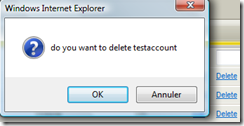
this technique has been around since .net 1.0, implemented in different ways. the onclientclick event is new in .net 2.0 and up, which makes it useful in this situation.
OnClientClick='<%# "return confirm(\"do you want to delete " + Eval("Name") + "\")" %>'>Visual basic
OnClientClick='<%# "return confirm(""do you want to delete " + Eval("Name") + """)" %>'>using the onclientclick event of the button, linkbutton, or imagebutton control, we can add the confirm javascript function.
for each double quote closing or opening a string, we need to add the escape character \. The Eval function takes as a parameter whichever field name we need to display in the confirm section.
this technique has been around since .net 1.0, implemented in different ways. the onclientclick event is new in .net 2.0 and up, which makes it useful in this situation.
Comments are welcome
asp.net (DataAccess): Filling a DropDownList using a DataReader With the SqlDataSource
the SqlDataSource component, has a property called datasource mode :
this property allows retreiving data using "DataSet" mode (the default), or "DataReader" mode.
so, for those who trust the SqlDataSource component, there's one way to bind grids, dropdownlists, formview and other controls. It is suitable for many situations, but not all.
Comments are welcome!
Friday, November 30, 2007
useful links of free stuff on the net to get up and running with asp.net and sql server 2005.
http://www.asp.net/community/projects/
asp.net 2.0 starter kit, with full source code, to get up to speed quickly at work, or startup a business
http://ajax.asp.net/toolkit
the Microsoft ajax control toolkit
http://ajax.asp.net
all about Microsoft implementation AJAX
http://ajaxload.info/
generate and download loading... GIF animations without hastle, and without imageready.
http://www.w3schools.com
great for beginners for html, xml, css, javascript, asp.net etc... works for intermediate level also (great site)
http://www.databaseanswers.com
great starter kit database designs for almost any business need (over 200 data models)
http://msdn2.microsoft.com/express/bb403186.aspx
starter database schemas for sql server 2005
http://www.asp.net/learn/
many free .net videos for asp.net, sql server 2005, and visual studio needs
Enjoy!
Comments are welcome.
asp.net 2.0 Security: a role management module in C#
instead of everytime developing the code to manage roles in the aspnetdb database, it is just as easy to put all the logic and code inside a user control. the control has one property, which is the UserName, once we have the username, we can add that user to a role, or to many roles, as well as removing the user from different roles.
in a few screenshots and code, I hope this article will help getting up to speed with asp.net 2.0 roles management.
here's a screen shot of the screen :
in this case we use numbers for roles 1, 2, 3 and Administrator
1. Code for binding the combobox
public void BindAllRoles()
{
    this.DropDownList1.DataSource = Roles.GetAllRoles();
    this.DropDownList1.DataBind();
}
2. Code for Binding the Grid: the grid only contains the roles the use is in.
public class BearCatRoles
    {
        private string mRoleName;

        public string RoleName
        {
            get { return mRoleName; }
            set { mRoleName = value; }
        }

    }
public void BindRolesForUser()
    {
        string[] roleslist = Roles.GetRolesForUser("the user name goes here");
        int i = 0;
        BearCatRoles br;
        List<BearCatRoles> lstbr = new List<BearCatRoles>();

        foreach (string brole in roleslist)
        {
            br = new BearCatRoles();
            br.RoleName = brole;
            lstbr.Add(br);
        }
        this.GridView1.DataSource = lstbr;
        this.GridView1.DataBind();

    }
in The code above:


we have a class called BearCatRoles (BearCat is a specific entity,
to not confuse it with roles. the class is used to bind the grid
 to a Generic list List<BearCatRoles>
for the BindRolesForUser() function :
	1. we get the roles list for the speicific user
	2. we loop through the array of roles, and fill a list of the BearCatRoles Class, then bind our grid.
	3. What is necessary is to decide where to bring the userName from.
  	For the button's click event, here's the code:
if (Roles.FindUsersInRole(this.DropDownList1.SelectedItem.Text, "user name goes herer").Length == 0)
            Roles.AddUserToRole(this.HiddenField1.Value, this.DropDownList1.SelectedItem.Text);
        BindRolesForUser();
For the gridview's delete command, here's the code:
protected void GridView1_RowCommand(object sender, GridViewCommandEventArgs e)
  {
      if (e.CommandName == "Delete")
      {
          Roles.RemoveUserFromRole(this.HiddenField1.Value, e.CommandArgument.ToString());
          BindRolesForUser();
      }
  }
Most important Lines in this module:
if (Roles.FindUsersInRole(this.DropDownList1.SelectedItem.Text, "user name goes herer").Length == 0)
           Roles.AddUserToRole(this.HiddenField1.Value, this.DropDownList1.SelectedItem.Text);
Roles.RemoveUserFromRole(this.HiddenField1.Value, e.CommandArgument.ToString());string[] roleslist = Roles.GetRolesForUser("the user name goes here");
this.DropDownList1.DataSource = Roles.GetAllRoles();
Here's the markup:
<asp:DropDownList ID="DropDownList1" runat="server" Width="226px">
</asp:DropDownList>
<asp:Button ID="Button1" runat="server" OnClick="Button1_Click" Text="Add Role For User" />
<asp:GridView ID="GridView1" runat="server" CellPadding="4" ForeColor="#333333" GridLines="None"
    OnRowCommand="GridView1_RowCommand" OnSelectedIndexChanged="GridView1_SelectedIndexChanged"
    OnRowDeleting="GridView1_RowDeleting">
    <Columns>
        <asp:TemplateField>
            <ItemTemplate>
                <asp:LinkButton ID="LinkButton1" CommandName="Delete" CommandArgument='<%# Eval("RoleName") %>'
                    runat="server">Delete</asp:LinkButton>
            </ItemTemplate>
        </asp:TemplateField>
    </Columns>
    <FooterStyle BackColor="#5D7B9D" Font-Bold="True" ForeColor="White" />
    <RowStyle BackColor="#F7F6F3" ForeColor="#333333" />
    <PagerStyle BackColor="#284775" ForeColor="White" HorizontalAlign="Center" />
    <SelectedRowStyle BackColor="#E2DED6" Font-Bold="True" ForeColor="#333333" />
    <HeaderStyle BackColor="#5D7B9D" Font-Bold="True" ForeColor="White" />
    <EditRowStyle BackColor="#999999" />
    <AlternatingRowStyle BackColor="White" ForeColor="#284775" />
</asp:GridView>
and Finally: in the web.config, concerning the roles, the following need to be defined:
<roleManager enabled="true" />
Comments are always welcome
Monday, November 26, 2007
An easy and clean way to use ajax tab container, tab panels, and user controls, to make a great multi-tab form
Setting up the navigation and user Interface
say we have a form, with asp.net 2.0. we need to allow the user to enter his 1. personnal information, 2. Professional information, 3. Contact Information, and finally, his 4. professional experience in the form of a list.
I. first we start by setting up the ajax tabs, to follow the pattern we set above.
<ajaxToolkit:TabContainer ID="tbCandidate" runat="server" ActiveTabIndex="0">
               <ajaxToolkit:TabPanel ID="step1" runat="server" HeaderText="Personnal Information">
                   <ContentTemplate>
                   </ContentTemplate>
               </ajaxToolkit:TabPanel>
               <ajaxToolkit:TabPanel ID="TabPanel1" runat="server" HeaderText="Professional Information">
                   <ContentTemplate>
                   </ContentTemplate>
               </ajaxToolkit:TabPanel>
               <ajaxToolkit:TabPanel ID="TabPanel2" runat="server" HeaderText="Contact Information">
                   <ContentTemplate>
                   </ContentTemplate>
               </ajaxToolkit:TabPanel>
               <ajaxToolkit:TabPanel ID="TabPanel3" runat="server" HeaderText="Professional Experience">
                   <ContentTemplate>
                   </ContentTemplate>
                   <HeaderTemplate>
                       Experience
                   </HeaderTemplate>
               </ajaxToolkit:TabPanel>
           </ajaxToolkit:TabContainer>
II. Now, let's create a user controls for each step, this will help us organize our tabs content, as well as keep code somewhat clean and organized.
The 4 user controls above are empty. we will place each one in its own tab. for the DataEntryControls folder, we will look at it later on.
III. Next, we will start by putting up the controls inside the user controls, which will set up our data entry screens. (for the sake of simplicity, we will have reduced Number of fields, 2 to 3 by user control, by tab).
Personnal Information :
Friday, November 23, 2007
A great site for starter kit databases :
Database answers , it's a company which has chosen to offer, online, over 200 database schemas (mostly proven and applied in production) on the net.
to go directly to the schemas, here's the link: Free Database Models Page .
I personnally have used two schemas for stock management and invoicing, and it worked great. I was able to provide solutions to my client, write from the database schemas, modified and customized to the application needs of course.
enjoy, and avoid reinventing the wheel!
ASP.NET 2.0 and up : RequiredField Validator and DropDownList
Simple: to validate a dropdownlist, the following is required:
1. AppendDataBoundItems="true" (this property allows us to add static items to the databound collection)
2. Have an item that has a value of 0 :
<asp:ListItem Text="Please select an item" Value="0" Selected="true" />
3. Add a required field validator with the property "InitialValue" set to 0.
<asp:RequiredFieldValidator runat="server" id="RequiredDropDown"
ControlToValidate="DropDownList1" InitialValue="0" ErrorMessage="Please select an Item" />
Here's the complete Code Listing
1: <asp:DropDownList ID="ddlPhases" runat="server" DataSourceID="sqldatasource1" Width="183px"
2: DataTextField="Phase" DataValueField="PhaseID" AppendDataBoundItems="true">
3: <asp:ListItem Text="Select a phase" Value="0" />
4: </asp:DropDownList>
5: 6: <asp:RequiredFieldValidator ID="RequiredFieldValidator1" runat="server" ControlToValidate="ddlPhases"
7: Display="Dynamic" InitialValue="0" ErrorMessage="Pleas Select a Phase" />
8: 9: <asp:SqlDataSource ID="sourcePhases" runat="server" ConnectionString="<%$ ConnectionStrings:CnString %>"
10: SelectCommand="Select PhaseID, Phase From Phase" />
asp.net: DropDownList and SQLDataSource In a User Control
this is a great way to reduce code in an asp.net form. using a user control, which encapsulates all the functionality of the dropdownlist, including the data binding (sqldatastource or objectdatasource).
here's the sample code for the ascx file:
1: <%@ Control Language="C#" AutoEventWireup="true" CodeFile="ddlPhaseEnglish.ascx.cs" Inherits="Controls_Lists_ddlPhaseEnglish" %>
2: <asp:DropDownList ID="ddlPhases" runat="server" DataSourceID="sqldatasource1"
3: Width="183px" DataTextField="Phase" DataValueField="PhaseID" AppendDataBoundItems="true">
4: <asp:ListItem Text="Select a phase" Value="0" />
5: </asp:DropDownList> 6: 7: <asp:SqlDataSource ID="sourcePhases" runat="server" ConnectionString="<%$ ConnectionStrings:CnString %>"
8: SelectCommand="Select PhaseID, Phase From Phase"></asp:SqlDataSource>
9: until now, it's all normal. what we add to make it the user control a DropDownList is a property to the ascx.cs file of this user control for the code behind (ascx.cs) file:
1: public String SelectedValue
2: {3: get { return this.ddlPhase.SelectedValue; }
4: set { this.ddlPhase.SelectedValue = value; }
5: }This property gives access to the dropdownlist, directly from the user control. Combining all these (the property SelectedValue in the code behind file and the ascx, we can have the following two line to define are dropdownlist:
1: <%@ Register Src="Controls/Lists/ddlPhase.ascx" TagName="ddlPhase" TagPrefix="uc8" %>
2: 3: <uc8:ddlPhase ID="DdlPhase1" runat="server" />
the above code is a lot cleaner and developer friendly than having the sqldatasource syntax included in every page. This method is just simpler than using a custom control, although the ideal is always a custom control in the bin folder.
Here's a screen shot of what the dropdownlists folder looks like in one of the applications where this technique is applied :
I hope this helps. Regards to web developpers
Subscribe to:
Posts (Atom)